It’s been a few weeks since the launch of the OpenAI Ad Manager in the UK, and GPT Ads have been a hot topic recently. Even since posting about how to get started with GPT Ads – the Ads Manager has already evolved with new features and changes showing that OpenAI seem to be committed to improving the experience in a relatively short space of time.
Let’s recap what GPT Ads actually are, and are not.
Forget keyword-driven targeting like a Google Ads search ad, topic based targeting like a Google Display Network campaign, it’s definitely not even anything like an attention grabbing ad served up on interest targets like Meta, and nothing even like a native campaign such as Taboola.
Then what are GPT Ads?
GPT ads are served contextually based on conversations within the ChatGPT platform, but only to those on Free, and the Go plan (a lighter paid plan).
Take into account that there are 900m+ active users across GPT, and only around 50m actually pay for premium plans – there is a significant target user base, but are they relevant?
And this is what a GPT Ad looks like:
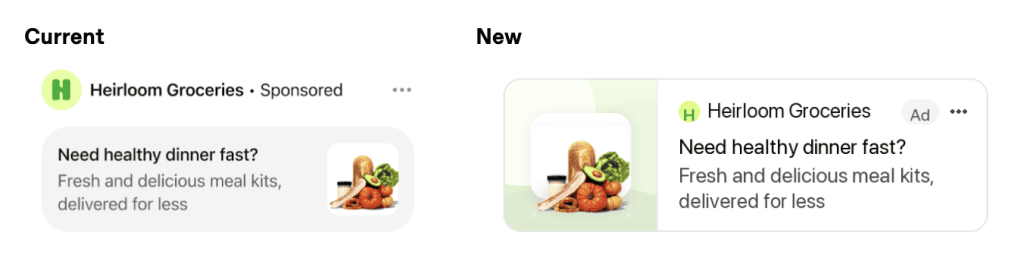
OpenAI have already updated the ad format from the version on the left to the new version on the right for readability on mobile devices (plus possibly make the fact it is an ad less conspicuous from ‘sponsored’ to ‘ad’.
How are GPT Ads targeted?
Unlike Google Ads where you target by keyword, GPT Ads are driven by the contextual state of a conversation the user is having. There is no insight, or performance data to identify what these conversations are – so targeting it largely left to the GPT Ad algorithm.
You can set a geographic location, but right now this is limited to a country-wide target, e.g. United Kingdom (which can be narrowed down to Scotland). Local businesses that only need to target specific towns or cities are out of luck at the moment.
The only tool advertisers really have to steer targets is the Context Hint. This is an optional field that allows you to describe your business, products and services. It is unclear whether GPT Ads really takes this into account, or if they use it all to target your ads, however I do believe from my own tests it has a weight in delivery.
Audience targeting on GPT Ads
As of last week (6th July 2026) GPT Ads quietly released a new feature into the GPT Ads interface – Custom Audience creation. This feature allows you to upload your own lists of email or phone contacts, including SHA-256 hashed lists in CSV or txt format.
However, you need to have a list greater than 25K to be able to use this – and this is matched users (to ChatGPT accounts), so in theory you’d ideally need lists of 100K emails or phone numbers to acquire a match rate good enough to be able to utilise these in your campaigns.
Audience lists currently allow you to increase/decrease bid adjustments on campaigns, as well as being able to target only that audience or exclude it from campaigns.
For larger advertisers it is a useful way to be able to exclude customers, or potentially create warm contact campaigns.
It does however show the direction of travel with GPT Ads, that this ad format can become audience driven. Contextualised conversations are ideal to be able to turn into in-market, affinity and topic based categories further down the line.
Initial Performance from GPT Ads
Of course, like most advertisers I am excited when a new channel and ad platform is released. I’ve been doing some of my own tests on the platform and this is what I’ve learned so far:
Mobile traffic and engagement is poor
Launched several campaigns, with varying ads on a click based objective. Each campaign had adequate CPC rates to serve. I deployed a rather basic “Context Hint” about my services and expertise – take note of this as we’ll come back to it later.
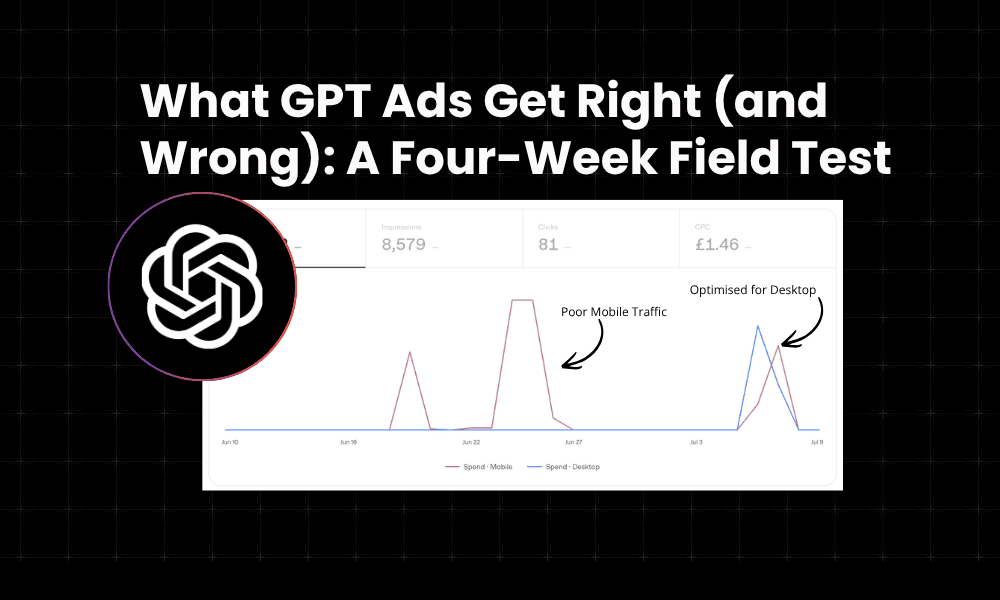
The example below is from a single campaign tested on different days, the red line is spend on mobile, blue line desktop.
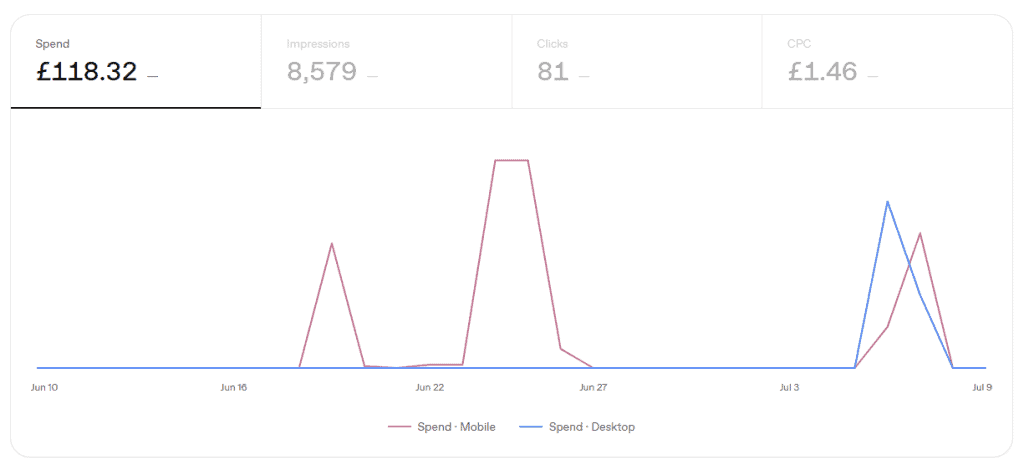
We’ll split this over two 2-week periods for clarity:
Week 1-2
- Spend: £68
- Impressions: 3,692
- Clicks: 36
- CPC: £1.90
Total mobile serving rate: 100%
Not a single click from desktop out of that initial spend.
When I dig deeper into my tracking and analytics, GPT ad traffic was coming in at around 2 second engagement rate.
Not an issue with the landing page, or ad – I had 3 distinct ads running in this campaign.
Mobile traffic was engaging extremely poorly. I’ve not seen this level of performance outside of GDN mobile app activity – where ad inventory is usually placed in such a way to push mistaken clicks.
Or… it could even be mobile click fraud. Who knows.
Anyway, I paused this campaign and took stock. There’s not much you can change to improve performance right now, there is no device target, there isn’t any way to see where your ads served or insights to work from apart from the device segmentation and your own instinct.
Week 3-4
- Spend: £50
- Impressions: 4,887
- Clicks: 45
- CPC: £1.11
This time we served roughly 50/50 across mobile and desktop, with a much lower CPC, more clicks and impressions. I even generated one conversion (not great quality).
The big result here was that that desktop traffic from ads served on GPT resulted in 1:30 – 2 minute engagement rates, instead of the <2s mobile traffic rates.
So, what changed?
- Ads: Added 3 more variations of ads with better headlines, different images (including my own face) and varying landing pages. The reasoning behind this would be that it could open serving up to different service areas, and still be relevant.
- Context Hint: I believe this to be the big one that changed how GPT ads served on device splits. Previously my context hint was relatively basic: basic description of services, basic level of information and some general keywords. This time I decided to treat it like a proper prompt. I outlined my ICP, potential buyers and what they might be searching for, and who not to target, with more detailed descriptions about my services. Whether this ultimately did change performance is still ongoing in tests.
- CPC: Costs are relatively high in GPT Ads, the interface will tell you that a CPC bid of £2 will result in no ads served, yet I have tested all the way from £0.20 to £2.50 to find a sweet spot.
This is just one campaign that I ran a structured test with pauses across a four week period. Right now, it is uncertain whether the context hint change, or the ads delivered the obvious shift from poor mobile traffic to better engaged desktop traffic – so I’ll be continuing to test this area.
Set a Daily Budget to avoid pacing issues
When you create a campaign, you get the option of daily or lifetime budget. It has been an absolute age since I’ve used a lifetime budget (mostly on Meta), so I use what I’m used to – the daily budget.
Luckily daily budgets don’t work like Google Ads and spend more than you set out. The minimum UK daily budget is £15 per day (and this can quickly be eaten up).
Yet, if you set a lifetime budget, of say £100 – you have no control over how quickly this will pace. If you set your CPC at say £2, this budget can be gone in a few hours.
Choose when you set up a campaign, as it cannot be changed after the campaign is created.
Explore the API for reporting
One of the downsides of using such a new ad platform is that the reporting element is light. Basic metrics are visualised (impressions, clicks, spend, conversions) – and these are changing as we move forward, now with sales ROAS and attributed sales ROAS.
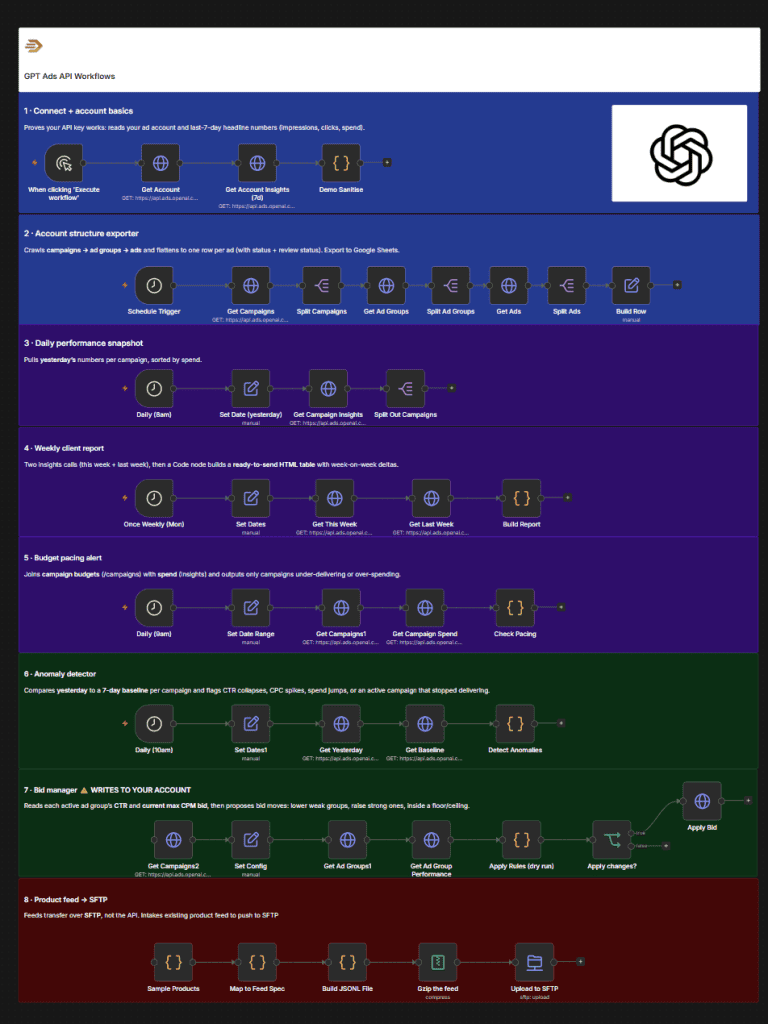
However, if you want to actually streamline your reports, and the maintenance of managing your GPT ads then the OpenAI Advertiser API is a brilliant place to get started. Building integrations for the likes of Google Ads or Meta Ads can be cumbersome, and time consuming, but with GPT Ads API you can streamline the majority of your daily work.
I’ve built a range of automated workflows that use the ads API, including daily performance snapshots straight to email, impression checkers, a weekly report – and automated bid adjustments.
The exciting thing is that we are at the start of the journey of GPT Ads, and are able to build integrations straight out of the box, so I’m optimistic for the future of this side of things.
Is GPT Ads like Google Ads?
This is something I see a lot, people are comparing GPT Ads with Google Ads, even Meta.
It is nothing like either of these platforms.
The intent, behaviour, and format is in a completely different space to what any of us have advertised in before.
Users are not searching for a keyword – e.g. “PPC Agencies in Edinburgh“.
They are exploring, refining, curating long-form requests. e.g.
“We are an electrical services company based in Livingston, we have current challenges with our CAC and lead to visit rates. We currently spend circa £2k on ads per month with an agency, but we’re looking for the best PPC Agency in Edinburgh to help audit our existing activity. Show me a list of agencies in Edinburgh that have specialisms in home services clients”
Where do you even start with a request such as that? No longer is the journey a single keyword variant, then click. People are asking with context, and it’s up to GPT ads to serve your ad at the right moment within that context.
This is an entirely new segment channel for ads, which has potential, yet has a long way to go to enable advertisers to get the most out of the platform and it’s user base.
My Take on GPT Ads
As an advertiser, I am excited about the prospect of an entirely new channel to diversify. It defines a new ways ads will be served in the future, and we can ultimately expect Google to follow suit with it’s planned ads in AI Overviews through 2026. Yet, it also proposes a challenge for advertisers for tracking the customer journey – with little transparency over serving, insights from where ads have been served – you can spend a lot, with very little return.
I’ve watched the speed at which OpenAI have launched Ad Manager, and from day 1 launch to now (four weeks later) they’ve already brought out audience list targeting, changed the ad formats, and improved functionality. So, I am hopeful that we can see many more improvements that turn GPT Ads into a serious line on a media plan. For me, I’ll be continuing to test ads on ChatGPT and would love to hear from others on performance results so far.